|
Product problems and issues relating to the documentation describing the physical product can be captured in Windchill PDMLink by creation of either a problem report (PR) or an enterprise change request (ECR). An organization's change process and structure determine whether a problem report is used, or if the change process is initiated with the creation of an ECR.
The diagram below illustrates how the Windchill PDMLink change process aligns with the CMII industry standard change process. Let's begin a walk-through of the process.
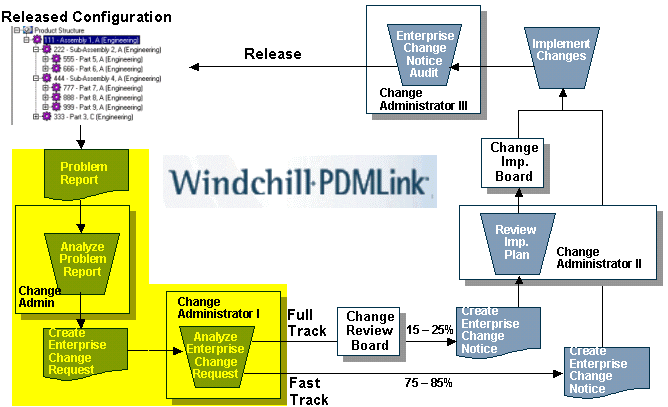
CMII Closed-loop Change Process -- Problem Report |
The purpose of the PR is to capture and describe a product problem or suggest a product enhancement from any source involved in your product development process. PRs capture pertinent information regarding the problem or issue, such as a brief description, initiator, and priority. Attachments can be added to the PR to improve the gathering and packaging of information, such as affected item (system data), affected end item (standalone product), and attachments (external data).
Once the PR is persisted to the database it has the state of Open, signifying that it has been created but has not been submitted to the change process. Once submitted to the process, the PR has the state of Under Review.
When the PR is created, it is assigned to a product. The initial reviewer is the Change Administrator I (CAI) assigned to the product identified in the PR. The CAI confirms that the PR is valid. There are three possible outcomes:
- Confirm the PR and send it on for ECR creation
- Reject the PR as an unsuitable idea
- Reject the PR as a duplicate of another PR
If the PR is confirmed, it is promoted to the Accepted state. If the PR is a duplicate or is rejected, it is promoted to the Resolved state. Any PR that is resolved by closing sends notification to the creator of the PR with the appropriate justification.
The CAI's view of a PR is shown in the following graphic. The highlighted section is a direct link back to the actual PR, which can be accessed simply by clicking on the link.
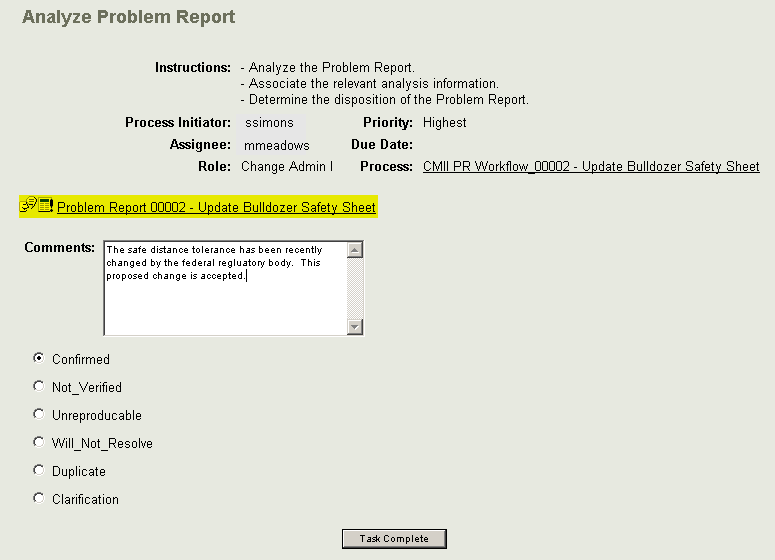
Analyze Problem Report Window |
Once the PR is analyzed and completed, it is routed based on the given disposition. A confirmed PR becomes an enterprise change request (ECR). The objective of the ECR is to describe a product defect or proposed enhancement in detail, so that a business decision can be made. There are two basic decisions that need resolution:
- Is there business justification to implement this change?
- If accepted, is the change fast track or full track?
The flow chart displayed previously indicates the process for creating the ECR. Creating the ECR does not pre-suppose the creation of a PR. The change request Creator has the option of providing additional information to validate the issue, or impact analysis with corresponding proposals. The Creator may also collaborate with technical reviewers to validate and assess impact. Once the ECR is saved, it has the state Open, and may then be submitted to the next step in the change process.
The CAI receives the created or updated ECR, reviews the content and analysis, and answers the two bulleted questions noted previously. The following graphic is an example of the CAI's view of the ECR. Notice the routing choices at the bottom of the Analyze ECR window, and the decisions required by the CAI upon review of the ECR. Let's discuss this further on the next page.
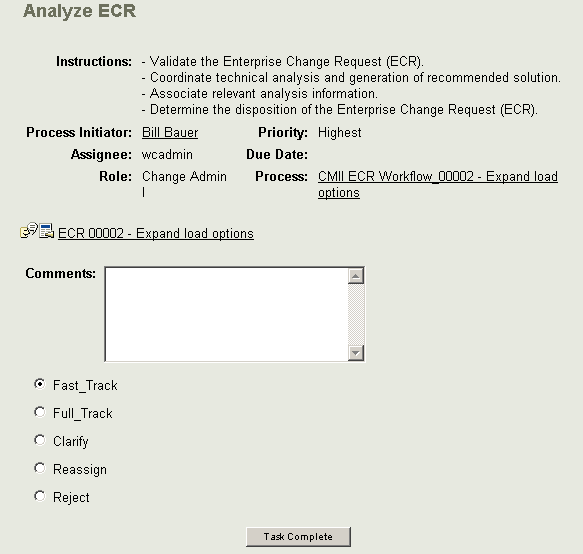
Analyze ECR Window |
|



